Secure Exchange & SE Agent

Enterprise File Transfer. Configured Centrally. Executed Automatically.

Secure Exchange is where file-transfer workflows are configured, orchestrated and reviewed. SE Agent carries out the configured file movement and processing on desktops and servers. Execution is either on AWS services or on the Secure Exchange server.

Central configurationAWS Edition or Server EditionSE Agent at the endpoint
The business challenge

Recurring transfers, without a custom build for each one.

Organizations routinely exchange statements, reports, account information, operational records, and other business documents between internal systems, customers, partners, and external service providers. These transfers often rely on custom-developed programs, independently maintained schedules, manual file handling, and separately managed encryption and delivery processes. Over time, this can introduce operational complexity, inconsistent procedures, increased maintenance requirements, and limited visibility into transfer activities.

Secure Exchange replaces these fragmented processes with centrally configured, automated file-transfer workflows. Through a unified management interface, authorized users define the source and destination, transfer schedule, processing requirements, encryption and decryption steps, and notification rules. Workflows can be configured to handle file detection, validation, transformation, encryption, delivery, and archival, as required.

With full visibility and an auditable history, the result is a more consistent and manageable approach to recurring file exchanges, reducing dependence on custom programming and manual intervention while providing greater control over how business information moves between systems.

Typical enterprise exchanges

  • Statements and invoices — Recurring distribution of statements, billing records and financial documents.
  • Usage and operational reports — Transaction records, activity reports and operational datasets.
  • Account and customer information — Movement of account, customer and business information.
  • Orders and information requests — Orders, service requests and supporting business data.
  • Document distribution — Delivery of business documents to internal departments and external recipients.

Processing in the workflow

A transfer can include encryption, decryption, compression, verification, file conversion and notifications. Those steps are part of the configured workflow.


Product family

One place to configure. An agent where the files are.

Secure Exchange is the management environment. SE Agent is the background service on the systems that send or receive files. The agent follows the workflow. It does not replace the platform.

Platform

Secure Exchange

Centralized File Transfer Management

Configure workflows, processing, schedules, endpoints and notifications, and review operational activity. Who executes the transfer depends on the edition.

  • Workflow configuration — Source, destination, processing steps, schedule and notifications.
  • Operational review — Reporting and alerts. CloudWatch in the AWS Edition, server logs in the Server Edition.
  • Access control — Microsoft Active Directory and Microsoft Entra ID, with role-based permissions.
  • Departments — More than one department in one environment, with separate configuration.
Compare the AWS and Server Editions
Endpoint service

SE Agent

Automated Endpoint File Transfer

A lightweight background service on desktops and servers. It detects, processes and moves files according to the workflow configured in Secure Exchange.

  • File detection — Watch a directory, or poll on a schedule.
  • Processing — PGP encryption and decryption, archive handling and configured scripts.
  • Connectivity — Outbound HTTPS only. No inbound firewall ports.
  • Installation — Typically under 30 minutes, then registered as an operating-system service.
Explore SE Agent
AWS Edition and Server Edition

Same configuration model. Different place of execution.

Both editions configure the workflow in Secure Exchange. They are not interchangeable. In the AWS Edition, AWS services execute the transfer. In the Server Edition, the Secure Exchange server does.

AWS Edition

Secure Exchange for AWS

Configure in Secure Exchange. Execute on AWS.

A Java Spring Boot-based control plane translates each transfer definition into AWS Lambda functions and AWS Step Functions state machines, then deploys and provisions these resources within the designated AWS account and region. Once deployed, file transfers execute natively within AWS, while the Secure Exchange application provides centralized monitoring and visibility into transfer execution, status, and results.

Execution workflow

Configure→Provision→Lambda & Step Functions→CloudWatch
  • Role — Configuration and orchestration.
  • Execution — AWS services. Work that exceeds Lambda’s 15-minute limit moves to Java workers on Amazon ECS, then returns to the Step Functions workflow.
  • Infrastructure — Your AWS account, or AWS operated by Synaptic Vision. Not an application server in the data path.
  • Fit — Transfers that should start from an S3 arrival or a schedule and run in a chosen account and region.
Server Edition

Secure Exchange Server

Configure and execute on the Secure Exchange server.

In this deployment model, the Secure Exchange application server performs both the control-plane and file-transfer processing functions within a multi-host architecture. Multiple server instances coordinate transfer workflows, establish connections to remote systems, process files, and manage delivery to designated destinations. This provides centralized management with distributed execution, scalability, and operational resilience.

Execution workflow

Configure→Connect→Process & Deliver→Record & Report
  • Role — Configuration and file-transfer execution.
  • Execution — Transfer workflows are executed by the Secure Exchange application servers.
  • Infrastructure — Your hardware and network, or Synaptic Vision’s hosting facility.
  • Fit — On-premises operation, including air-gapped networks, mainframe connectivity and established legacy systems.
In summary: The AWS Edition configures and orchestrates. AWS services execute the transfer. The Server Edition configures the workflow and the Secure Exchange server performs the transfer.
Deployment and hosting

Four ways to run it. Two ways to execute a transfer.

Choose who operates the infrastructure, and which edition executes the file transfer. The AWS options do not become the Server Edition, and the server options are not serverless.

Customer-managed

Your AWS account

You operate the AWS accounts and credentials. Secure Exchange configures the workflow. AWS services execute the transfer.

AWS Edition
Customer-managed

Your infrastructure

Installed on your hardware, in your network or data centre. You operate it. The Secure Exchange server executes the transfer.

Server Edition
Synaptic-managed

AWS, operated by us

Synaptic Vision operates the platform, monitoring and support in AWS. AWS services still execute the transfer.

AWS Edition
Synaptic-managed

Our hosting facility

Synaptic Vision provides the facility, infrastructure and operations. The Secure Exchange server executes the transfer.

Server Edition
Inside the AWS Edition

The control plane builds the data plane.

Secure Exchange generates AWS Lambda functions and Step Functions state machines from standardized templates and deploys them to the designated AWS account and region. Departments can maintain separate accounts, encryption keys, and execution logs to support operational isolation and governance. File transfers execute natively within AWS, while Secure Exchange provides centralized monitoring and visibility into execution status and results.

1

File arrival

A partner or internal system places a file in the designated Amazon S3 bucket for that file-based transfer.

2

Workflow start

The S3 event is routed through Amazon EventBridge and starts the Step Functions state machine for that transfer.

3

Processing

Lambda functions validate, decrypt, decompress, transform, compress and encrypt, as the workflow defines. Longer steps move to ECS.

4

Delivery and record

The file is sent by SFTP, FTPS, API or SMB. Transitions are written to Amazon CloudWatch.

1

Schedule starts

Amazon EventBridge Scheduler starts the Step Functions state machine on the configured schedule.

2

Retrieve

Available files are pulled from the remote system. Deduplication is used so a file is not processed twice.

3

Processing

Files land in Amazon S3 with a checksum, then decrypt, decompress, validate, transform and encrypt as configured.

4

Delivery and record

Delivery goes to internal targets or onward partners. Alerts and CloudWatch records follow the run.

Past the Lambda time limit

Steps that need more than 15 minutes, including large files, heavy encryption or slow endpoints, are routed to long-running Java workers on Amazon ECS. The Step Functions workflow resumes when that work finishes.

Retries and retained failures

Steps retry with exponential back-off. Failures that remain are quarantined and alerted. The transfer and its data are kept so the run can be reviewed and replayed.

Account and region

Each line of business can use its own AWS account, credentials, keys and logs. The workload runs in the region selected for that transfer.

Protocols and integrations

Connect to the systems partners already use.

Secure Exchange supports the protocols and interfaces listed below, allowing transfer workflows to be configured and reused across trading partners without requiring custom software development for each integration.

  • SFTP – OpenSSH
  • SFTP – Enterprise SSH Client & Server
  • FTPS (FTP over TLS)
  • IBM Connect:Direct (NDM)
  • Amazon S3
  • Google Cloud Storage (GCS)
  • TIBCO MFT Platform Server (FTPS)
  • SMB (Server Message Block)
  • Secure Document Storage
  • HTTPS Pull
  • Email
  • Microsoft SharePoint
  • Custom API Integration (Open Data Protocol)
  • Custom API Integration (DSS)
  • Secure REST API
Capabilities

What the platform is built to do.

Encryption and access control

PGP encryption, AWS KMS, and least-privilege IAM. Credentials can be held in AWS Secrets Manager or CyberArk, where that integration is used.

Configuration, not a new build

New workflows, including conversion, validation, verification and notifications, are defined in configuration.

More than one department

Separate configuration, credentials and permissions for each business unit in the same platform.

Reporting and alerts

Online reporting, execution metrics and logs, with alerts for failures and unusual activity.

Microsoft Active Directory and Entra ID

Role-based access control through Microsoft Active Directory and Microsoft Entra ID, with centralized identity management and auditable records of user and administrative activities.

Additional endpoints

Further protocols and destinations are added as integrations, rather than as a new transfer program for each one.

SE Agent

File movement on the desktop and the server.

SE Agent is a background service installed on systems that need to send or receive files. It executes workflows configured in Secure Exchange, automatically detecting, processing, and delivering files. It provides a secure endpoint for file transfers between internal and external systems.

  • Operating systems — Linux, Windows, macOS, AIX, Solaris and z/OS, on systems that can run Java 21 or later.
  • Distribution — A single Java JAR with an embedded database. Approximately 150 MB of RAM. No additional middleware.
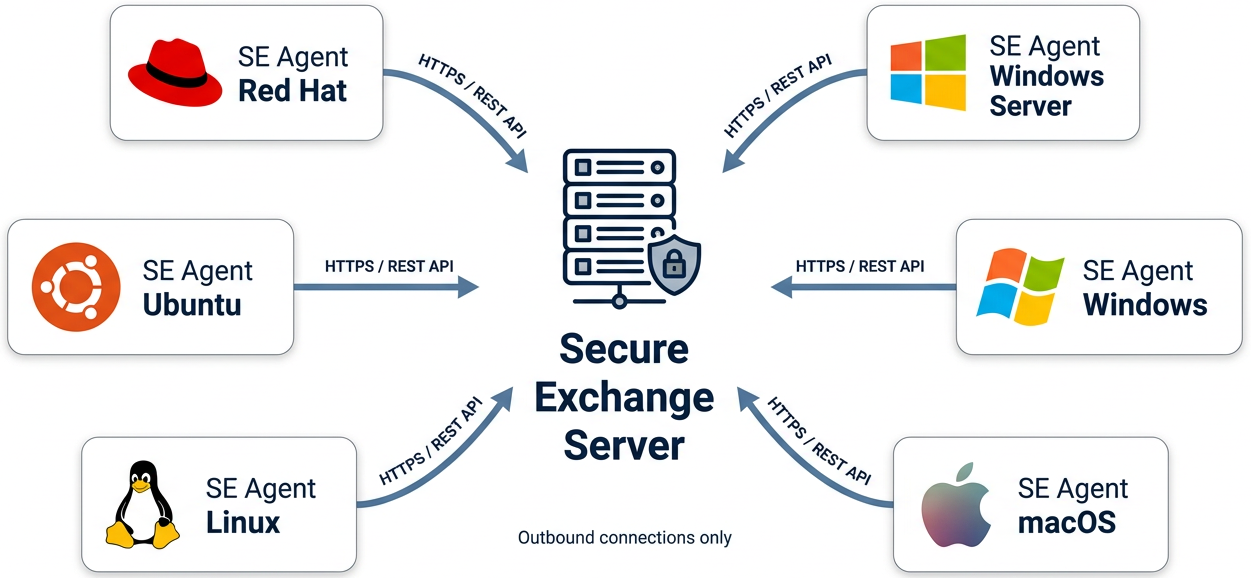
  • Network — Outbound HTTPS only. No inbound firewall ports.
  • Installation — Copy the application file, complete the setup wizard and register SE Agent as an operating-system service.
SE Agents on Red Hat, Ubuntu, Linux, Windows Server, Windows and macOS connect to the Secure Exchange server over HTTPS / REST API using outbound connections only.

Outbound upload

Watches designated directories. Applies PGP encryption when that step is configured, then sends the file to the assigned submission group.

Inbound download

Retrieves files on a schedule or from an email trigger. Decrypts, decompresses or runs a configured script before local delivery.

Notifications

Bilingual HTML notices for success, failure, password expiry and automatic update events.

Administration

A command-line view of status, statistics, health and manual controls, plus a setup wizard for the first configuration.

<30min

Typical installationOn a new desktop or server, including the initial configuration.

4–6days

Typical implementationPlanning through testing for a first workflow. The time depends on the environment.

150MB

Approximate memoryRAM for the single JAR and its embedded database.

0

Inbound portsSE Agent communicates with outbound HTTPS only.

Without SE Agent

  • Manual Transfers — A person must log in to upload or download each file.
  • Uncertain Timing — A transfer can be delayed or missed when it depends on someone being available.
  • Scattered Records — File movement is not gathered into one operational history.
  • Manual Encryption — PGP steps are applied by hand, so they can be skipped or applied inconsistently.
  • Per-Machine Updates — Updates are applied by IT on each machine.

With SE Agent

  • Automated Transfers — Files are transferred automatically in the background, eliminating the need for manual intervention.
  • File Detection — Detects files through directory monitoring, with transfers also configurable for scheduled execution.
  • Centralized History — Transfer activities and processing steps are recorded, providing a consolidated, auditable operational history.
  • Automated Encryption — PGP encryption and decryption can be automated, reducing manual handling and the risk of human error.
  • Managed Updates — Service updates are installed automatically, with update packages verified before installation.
Frequently Asked Questions

Common Questions About Secure Exchange

What is the difference between the AWS Edition and the Server Edition?

The AWS Edition uses Secure Exchange as the configuration and orchestration layer. It automatically provisions AWS Lambda functions and Step Functions state machines to execute file-transfer workflows using AWS services. Once deployed, the application server is not in the file-transfer data path; AWS services handle the execution.

The Server Edition runs on server infrastructure, either within the customer’s own network or in Synaptic Vision’s hosting facility. Secure Exchange configures and manages the workflows, while the Secure Exchange server performs the file-transfer operations directly.

Both editions support automated file transfers, centralized workflow management, and integration with external and internal systems. The primary difference is where and how the file-transfer operations are executed.

Can Synaptic Vision host and manage Secure Exchange for us?

Yes. Synaptic Vision can provide fully managed hosting for both the AWS Edition and Server Edition. The AWS Edition can operate within Synaptic Vision’s AWS environment or the customer’s own AWS account. Similarly, the Server Edition can operate within Synaptic Vision’s hosting facility or the customer’s own server infrastructure.

With managed hosting, Synaptic Vision assumes responsibility for the underlying infrastructure and platform operations. Regardless of the hosting arrangement, the file transfer execution model remains unchanged: SE Agent continues to handle file movement at the designated endpoints.

Does SE Agent require inbound firewall ports?

No. SE Agent uses outbound HTTPS to Secure Exchange. Inbound ports are not required on the desktop or server where the agent is installed.

Which operating systems does SE Agent support?

SE Agent supports operating systems capable of running Java 21 or later, including Linux (Red Hat, Ubuntu and other distributions), Windows, Windows Server, macOS, IBM AIX, Oracle Solaris and IBM z/OS.

How quickly can we get started?

A typical SE Agent installation, including initial configuration, takes less than 30 minutes. A typical initial implementation, from planning through configuration and testing, takes approximately four to six business days. Actual timelines depend on the customer’s environment, integration requirements, and complexity. These timeframes are estimates, not guaranteed delivery commitments.

We typically begin with a demonstration of a file-transfer workflow using your environment to illustrate how Secure Exchange integrates with your systems and supports your file-transfer requirements.

See it on one of your transfers.

Request a demonstration built around one file-transfer workflow from your environment, on the AWS Edition, the Server Edition, or a Synaptic-managed deployment.